Options
Interpolation specific options are handled via an instance of InterpolationPolicy.
Default options can be obtained via
from static_interpolation.config import InterpolationPolicy
policy = InterpolationPolicy()
policy.method
policy.Method.linear
policy.Method.cubic
# or equivalently
InterpolationPolicy.Method.linear
InterpolationPolicy.Method.cubic
Method
Defines the interpolation type.
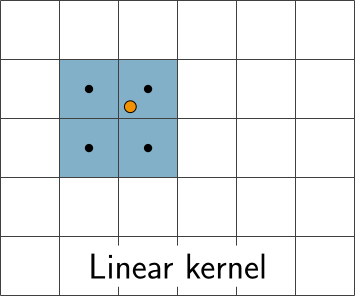
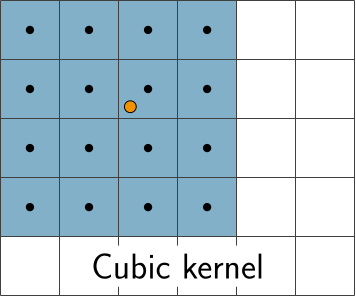
Methond.linear: Bilinear interpolationMethond.cubic: (default) Bicubic (Catmull-Rom) interpolation with \(\alpha = 0.5\)
Boundary
All sampling points that lie outside of the underlying data range(pixel grid) are ignored.
Sampling points which lie inside the data range but whose kernel contains points outside of it are affected by the following options.
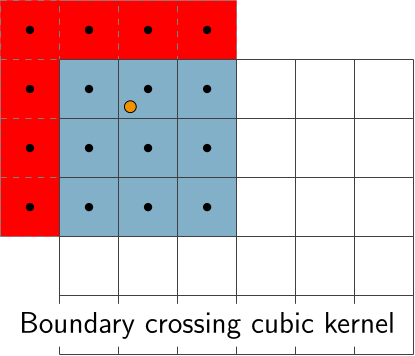
Boundary.reject: Do not interpolate samples for which data points outside the data range is needed.Boundary.extrapolate_nearest: Data values outside of the data range are are filled by the value of the nearest pixel.Boundary.extrapolate_linear: (default) Data values outside of the data range are are filled by linear extrapolation from the nearest points in the data range.
Masking
This option specifies how masked data points(pixels) should be treated.
Masking.Strict(): (default) A Sampling point is considered masked if any of the data points needed for its interpolation is masked. E.g. for cubic(linear) interpolation this means that an output sample point is masked, if any of its nearest 4x4 (2x2) pixel values on the detector is masked.Masking.MeanFill(max_masked:int,mask_nearest:bool): Try to fill in masked data values by taking the mean of the 8 surrounding pixels.
max_masked: is an integer in 1,…,7 (default=3), specifying how many surrounding pixels are at most allowed to be masked.
mask_nearest: is a boolean flag (default=True). If it is set, then sampling points whose nearest data point is masked (before trying to fill their values) are always masked as well.
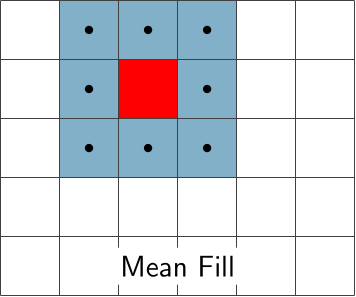
max_masked of the blue pixels are masked as well.OverlapMode
If there are n image panels e.g.
layout = ImageLayout(n_panels=n,num_x=6,num_y=4)
then each sampling point has to be defined in pixel coordinates of each of the n panels.
E.g. consider m sampling points, then the sampling grid shape has to be (n,m,2).
It can happen that one of the m sampling points lies in the data range of more than one of the n panels. This is a problem since then there is no unique association between the underlying data and this sampling point, which means that there is more than one possible interpolation result.
This option specifies what to do in such a case.
OverlapMode.error: (default) Raises a ValueException ifSamplingGridcontains points that lie in the data range of more than one panel.OverlapMode.first: Use the "first" data panel (by panel id) in whose data range a given sample point lies.